# Volvo2Mqtt
![Supports aarch64 Architecture][aarch64-shield]
![Supports amd64 Architecture][amd64-shield]
![Supports armhf Architecture][armhf-shield]
![Supports armv7 Architecture][armv7-shield]
![Supports i386 Architecture][i386-shield]
![Project Maintenance][maintenance-shield]
[![GitHub Release][releases-shield]][releases]
[![GitHub Activity][commits-shield]][commits]
This component establishes a connection between the newer AAOS Volvo cars and Home Assistant via MQTT.
Maybe this component works also with other Volvo cars. Please try out the native Volvo [integration](https://www.home-assistant.io/integrations/volvooncall/) before using this component! If the native component doesn't work for your car, try this mqtt bridge.
## Confirmed working with
- XC40 BEV (2023)
- XC40 BEV (2022)
- XC40 PHEV (2021)
- V60 T8 PHEV (2023)
- C40 PHEV (2023)
- C40 PHEV (2022)
- XC90 T8 PHEV (2023)
- XC60 PHEV (2023)
- XC60 PHEV (2022)
- V90 PHEV T8 (2019)*
*only partly working
Please let me know if your car works with this addon so I can expand the list!
## Supported features
- Lock/unlock car
- Start/stop climate
- Sensor "Battery Charge Level"
- Sensor "Electric Range"
- Sensor "Charging System Status"
- Sensor "Charging Connection Status"
- Sensor "Estimated Charging Finish Time"
- Sensor "Door Lock Status (All doors, tank lid, and engine hood)"
- Sensor "Window Lock Status (All windows and sunroof)"
- Sensor "Engine Status"
- Sensor "Odometer"
- Sensor "Tire Status"
- Sensor "Fuel Status"
- Sensor "Average Fuel Consumption"
- Sensor "Average Speed"
- Car Device Tracker
- Multiple cars
NOTE: Energy status currently available only for cars in the Europe / Middle East / Africa regions. [source](https://developer.volvocars.com/apis/energy/v1/overview/#availability)
## Setup
Docker:
Just install this addon with the following command.
Please note to fill in your settings inside the environment variables.
`docker run -d --pull=always -e CONF_updateInterval=300 -e CONF_babelLocale='de' -e CONF_mqtt='@json {"broker": "", "username": "", "password": "", "port": 1883}' -e CONF_volvoData='@json {"username": "", "password": "", "vin": "", "vccapikey": "", "odometerMultiplier": 1}' -e TZ='Europe/Berlin' --name volvo2mqtt ghcr.io/dielee/volvo2mqtt:latest`
HA Add-On:
[](https://my.home-assistant.io/redirect/supervisor_add_addon_repository/?repository_url=https%3A%2F%2Fgithub.com%2FDielee%2Fvolvo2mqtt)
Here is what every option means:
| Name | Type | Default | Description |
| -------------------- | :-------: | :----------: | --------------------------------------------------------------- |
| `CONF_updateInterval` | `int` | **required** | Update intervall in seconds. |
| `CONF_babelLocale` | `string` | **required** | Select your country from this [list](https://www.ibm.com/docs/en/radfws/9.7?topic=overview-locales-code-pages-supported). "Locale name" is the column you need! |
| `CONF_mqtt` | `json` | **required** | Broker = Mqtt Broker IP / Username and Passwort are optional! Broker port can be changed. If no value is given, port 1883 will be used. |
| `CONF_volvoData` | `json` | **required** | Username and password are REQUIRED. Car vin can be a single vin or a list of multiple vins like `["vin1", "vin2"]`. If no vin is provided, ALL of your vehicles will be used. Vccapi key is REQUIRED. Get your Vccapi key from [here](https://developer.volvocars.com/account/). Odometer Multiplier is sometimes 10, sometimes 1. Try what's right for your car. If you leave it empty, the multiplier will be 1. |
| `CONF_debug` | `string` | | Debug option (true/false) - optional! |
| `TZ` | `string` | | Container timezone eg "Europe/Berlin" from [here](https://docs.diladele.com/docker/timezones.html)|
## Lovelace sample card
Show me more!
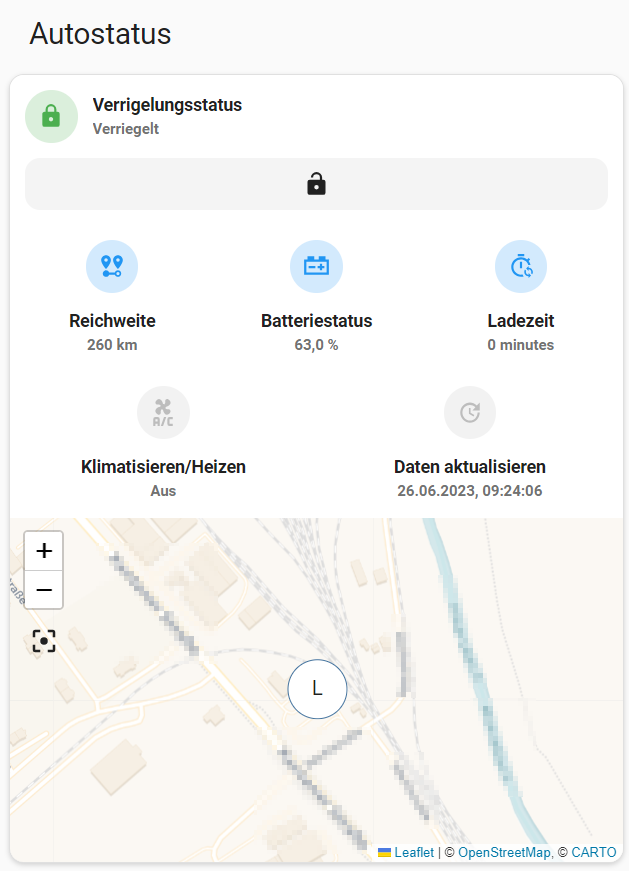
Lovelace card sample
```
type: vertical-stack
title: Autostatus
cards:
- type: custom:vertical-stack-in-card
cards:
- type: custom:mushroom-lock-card
entity: lock.volvo__lock_status
name: Verrigelungsstatus
- type: horizontal-stack
cards:
- type: custom:mushroom-entity-card
entity: sensor.volvo__electric_range
name: Reichweite
layout: vertical
- type: custom:mushroom-entity-card
entity: sensor.volvo__battery_charge_level
name: Batteriestatus
layout: vertical
- type: custom:mushroom-entity-card
entity: sensor.volvo__estimated_charging_time
layout: vertical
name: Ladezeit
- type: horizontal-stack
cards:
- type: custom:mushroom-entity-card
entity: switch.volvo__climate_status
tap_action:
action: toggle
layout: vertical
name: Klimatisieren/Heizen
- type: custom:mushroom-template-card
primary: Daten aktualisieren
secondary: '{{ states(''sensor.volvo__last_data_update'')}}'
icon: mdi:update
layout: vertical
entity: button.volvo__update_data
- type: conditional
conditions:
- entity: sensor.volvo__estimated_charging_time
state_not: '0'
card:
type: custom:mushroom-entity-card
entity: sensor.volvo__estimated_charging_finish_time
name: Ladung vorraussichtlich abgeschlossen
show_name: true
- type: map
entities:
- entity: device_tracker.volvo__location
default_zoom: 16
dark_mode: false
hours_to_show: 0
auto_fit: true
aspect_ratio: '16:9'
```
[aarch64-shield]: https://img.shields.io/badge/aarch64-yes-green.svg
[amd64-shield]: https://img.shields.io/badge/amd64-yes-green.svg
[armhf-shield]: https://img.shields.io/badge/armhf-yes-green.svg
[armv7-shield]: https://img.shields.io/badge/armv7-yes-green.svg
[i386-shield]: https://img.shields.io/badge/i386-yes-green.svg
[releases]: https://github.com/Dielee/volvo2mqtt/releases
[releases-shield]: https://img.shields.io/github/release/Dielee/volvo2mqtt.svg
[maintenance-shield]: https://img.shields.io/maintenance/yes/2023.svg
[commits-shield]: https://img.shields.io/github/commit-activity/y/Dielee/volvo2mqtt.svg
[commits]: https://github.com/Dielee/volvo2mqtt/commits/main