---
title: 🔎 How to inspect your backups
eleventyNavigation:
key: 🔎 Inspect your backups
parent: How-to guides
order: 5
---
By default, borgmatic runs proceed silently except in the case of warnings or
errors. But if you'd like to to get additional information about the progress of
the backup as it proceeds, see the [logging
documentation](https://torsion.org/borgmatic/reference/command-line/logging/)
for details.
## Backup summary
If you're less concerned with progress during a backup, and you only want to see
the summary of archive statistics at the end, use the stats option when
performing a backup:
```bash
borgmatic --stats
```
## Existing backups
borgmatic provides convenient actions for Borg's
[`list`](https://borgbackup.readthedocs.io/en/stable/usage/list.html) and
[`info`](https://borgbackup.readthedocs.io/en/stable/usage/info.html)
functionality:
```bash
borgmatic list
borgmatic info
```
You can change the output format of `borgmatic list` by specifying your own
with `--format`. Refer to the [borg list --format
documentation](https://borgbackup.readthedocs.io/en/stable/usage/list.html#the-format-specifier-syntax)
for available values.
New in version 1.9.0 There are
also `repo-list` and `repo-info` actions for displaying repository information
with Borg 2.x:
```bash
borgmatic repo-list
borgmatic repo-info
```
See the [borgmatic command-line
reference](https://torsion.org/borgmatic/reference/command-line/) for
more information.
### Searching for a file
New in version 1.6.3 Let's say
you've accidentally deleted a file and want to find the backup archive(s)
containing it. `borgmatic list` provides a `--find` flag for exactly this
purpose. For instance, if you're looking for a `foo.txt`:
```bash
borgmatic list --find foo.txt
```
This lists your archives and indicate those with files matching `*foo.txt*`
anywhere in the archive. The `--find` parameter can alternatively be a [Borg
pattern](https://borgbackup.readthedocs.io/en/stable/usage/help.html#borg-patterns).
To limit the archives searched, use the standard `list` parameters for
filtering archives such as `--last`, `--archive`, `--match-archives`, etc. For
example, to search only the last five archives:
```bash
borgmatic list --find foo.txt --last 5
```
## Listing database dumps
If you've enabled borgmatic's [database
hooks](https://torsion.org/borgmatic/how-to/backup-your-databases/), you
can list backed up database dumps via borgmatic. For example:
```bash
borgmatic list --archive latest --find *borgmatic/*_databases
```
This gives you a listing of all database dump files contained in the latest
archive, complete with file sizes.
New in borgmatic version
1.9.0Database dump files are stored at `/borgmatic` within a backup
archive, regardless of the user who performs the backup. (Note that Borg
doesn't store the leading `/`.)
With Borg version 1.2 and
earlierDatabase dump files are stored at a path dependent on the [runtime
directory](https://torsion.org/borgmatic/reference/configuration/runtime-directory/)
in use at the time the archive was created, as Borg 1.2 and earlier do not
support path rewriting.
Prior to borgmatic version
1.9.0Database dump files were instead stored at `~/.borgmatic` within
the backup archive (where `~` was expanded to the home directory of the user
who performed the backup). This applied with all versions of Borg.
## Logging
By default, borgmatic only logs to the console. But to enable simultaneous
syslog or file logging, see the [logging
documentation](https://torsion.org/borgmatic/reference/command-line/logging/)
for details.
## Finding differences between two archives
New in borgmatic version
2.1.3You can compare differences between two archives. For example:
```bash
borgmatic diff --archive latest --second-archive host-2023-01-02T04:06:07.080910
```
This shows the differences (file contents, user/group/mode) between the latest
archive and the second one supplied.
Note that, by default, `borgmatic diff` compares everything in the archives; that
is, patterns are _not_ taken into consideration. If you require this, supply the
`--only-patterns` flag.
See the [Borg](https://borgbackup.readthedocs.io/en/stable/usage/diff.html)
documentation for information on output format, what is compared, and more.
## Browsing backups
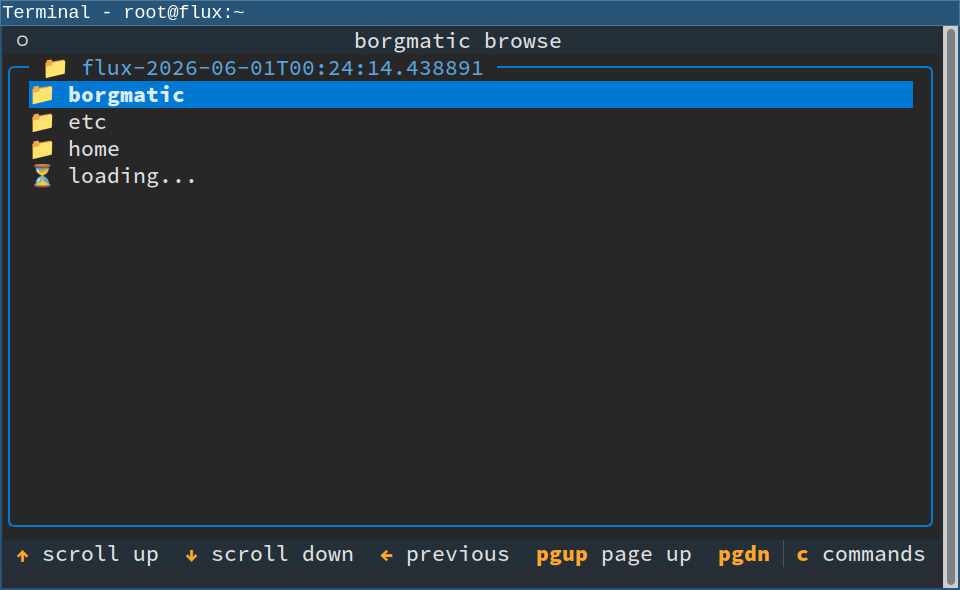
New in version 2.1.6 Experimental feature borgmatic has an
experimental console UI for browsing your repositories, archives, and files.
Here's what it looks like:
 This feature is not intended to be a general-purpose Borg UI with every
borgmatic feature, but rather it's for use cases like quickly looking at the
contents of your backups when you're feeling too lazy to type out a full
borgmatic command-line.
Depending on how you installed borgmatic, it may not have come with the
necessary Python libraries to support the browse action. (borgmatic's
[stand-alone
binary](https://projects.torsion.org/borgmatic-collective/borgmatic/releases)
does not currently include them.) If you originally [installed borgmatic with
uv](https://torsion.org/borgmatic/how-to/install-borgmatic/), run the following
to install the libraries needed for the browse action:
```bash
sudo uv tool install borgmatic[browse]
```
Omit `sudo` if borgmatic is installed as a non-root user.
Once the libraries are installed, run the following to access the browse action:
```bash
borgmatic browse
```
This launches a console UI where you can select a borgmatic configuration file
(if there's more than one), select a Borg repository, select an archive in that
repository, and even browse the backed up files in that archive.
Use the keyboard or the mouse to navigate the UI. The footer at the bottom of
the screen shows some of the available keys. Logs show up directly in the UI at
the [selected
verbosity](https://torsion.org/borgmatic/reference/command-line/logging/),
although logs are hidden by default.
Please [provide
feedback](https://torsion.org/borgmatic/#support-and-contributing) if you find
this feature useful—or even if you don't, but would like it to become useful.
This feature is not intended to be a general-purpose Borg UI with every
borgmatic feature, but rather it's for use cases like quickly looking at the
contents of your backups when you're feeling too lazy to type out a full
borgmatic command-line.
Depending on how you installed borgmatic, it may not have come with the
necessary Python libraries to support the browse action. (borgmatic's
[stand-alone
binary](https://projects.torsion.org/borgmatic-collective/borgmatic/releases)
does not currently include them.) If you originally [installed borgmatic with
uv](https://torsion.org/borgmatic/how-to/install-borgmatic/), run the following
to install the libraries needed for the browse action:
```bash
sudo uv tool install borgmatic[browse]
```
Omit `sudo` if borgmatic is installed as a non-root user.
Once the libraries are installed, run the following to access the browse action:
```bash
borgmatic browse
```
This launches a console UI where you can select a borgmatic configuration file
(if there's more than one), select a Borg repository, select an archive in that
repository, and even browse the backed up files in that archive.
Use the keyboard or the mouse to navigate the UI. The footer at the bottom of
the screen shows some of the available keys. Logs show up directly in the UI at
the [selected
verbosity](https://torsion.org/borgmatic/reference/command-line/logging/),
although logs are hidden by default.
Please [provide
feedback](https://torsion.org/borgmatic/#support-and-contributing) if you find
this feature useful—or even if you don't, but would like it to become useful.